You’ve been asked to host a track meet. Maybe it’s your first time, maybe your tenth – either way, there are a lot of moving pieces. Rosters, events, heat sheets, timing, scoring, results. Drop any one of them and you’ve got 150 kids standing around and parents getting impatient.
Here’s how I run my meets. I coach at Bradshaw Christian in Sacramento – a small school program, middle school and high school. I host about 5 middle school 5-way track meets and time 2-3 more high school dual meets each year. We also time several cross country meets and a couple invitationals in the fall. I’ve gotten the middle school track meets with 150+ kids down to under 2 hours start to finish. I’m not saying this is the best or only way to do it, but this is my process.
Before The Meet
1. Create the Meet
Creating the meet takes about two minutes. Give it a name, date, location, and set your scoring format. Dual meet? [5,3,1] for individual events. Invitational? [10,8,6,4,2,1] or whatever your league uses.
Pick your sport (track & field or cross country) and you’re ready to add events.
2. Add Your Events
Use a template to add your full event lineup in one click – high school track, middle school track, or custom. The template creates one race per event per division. You can customize from there: rename events, reorder, add extra heats.
3. Set Up Your Roster
Don’t do anything else until you get your athletes into the system. You can import rosters from Athletic.net or MileSplit, or add athletes manually. Every athlete gets a name, grade, gender.
If you’re hosting a multi-school meet, visiting coaches can enter their own rosters, or you can import them as guest athletes. (More on that later)
4. Plan Your Event Entries (Optional)
Even though we don’t assign heats, you still probably want to plan out which of your kids are doing which events, who’s going, and who need rides. If you have our Event Planner, you can assign athletes to events on a grid, see limits enforced in real time, and print the whole thing for race day.
Print this out and post it at your team tent. For middle school, you may want to get a parent to hang out at the team camp to keep kids on task. But really, that’s part of learning the process. I stress to my MS athlete’s that it’s up to them to pay attention to the announcements and warm up and get to the start on time.
5. Find Volunteers
It takes a lot of people to run a track meet. We usually use SignUpGenius
Here’s my standard list:
- Meet director - that’s you! Be a floater and try not to do any of the rest of these unless you also want to take on the duty of the MC/Announcer
- Announcer - if not you. Keep the meet on track by announcing when for kids to line up for each event.
- Starter - hopefully you have the funds to hire a pro. It’s not too expensive and they’re worth it.
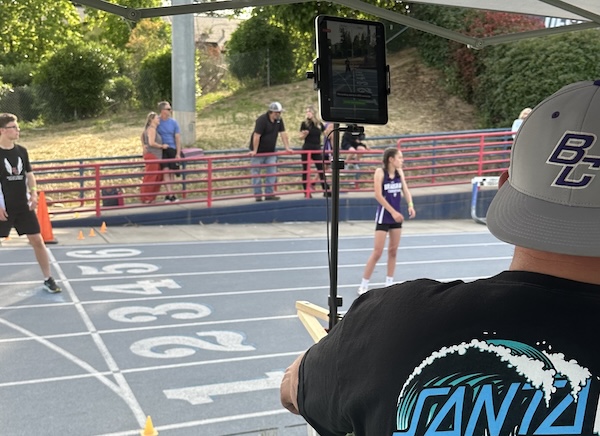
- Head Timer - Man the iPad - It’s not hard but it takes a level of confidence and concentration to be in charge of timing. Our school offers parents volunteer hours. And I tell parents I’ll vouch for double-hours for this position. I’m currently blessed to have the same dad that’s been volunteering for this for the past 2 years.
- Race Recorder - If using our OCR scanning it really helps to find someone with good handwriting. This person will write down each finisher’s number in order. If using our iPad app, that’s all they need to do. The times will be sent in from the iPad. If you are using another timing method, your race record will also write down the times.
- Data importer. - This volunteer takes the sheets handed over from Race Recorder and uses their own phone to scan in the results into RaceApp. For middle school meets, I usually get one of our high school athletes to do this - they pick it up fast and are great at it. The same volunteer tapes each result sheet to a large piece of cardboard (like a tri-fold used for school presentations). Keep this as a backup! You may want to refer back to it when you get home.
- Backup Timer - Stuff happens. Just get a volunteer to use their phone to record a video of every race. It’s rare that you’ll need this but it’s great insurance. If worse comes to worse you can always reconstruct times from the video. There are some key tricks to remember:
- Have the person stand at the finish line next to or opposite your head timer/iPad
- Start recording when the gun is up BEFORE the race starts.
- Have the camera aiming at the starter then once the race starts follow the lead runner to the finish
- IMPORTANT Hold the camera steady on the finish line until the last person crosses it. Then stop recording after.
- You can use our free video analyzer tool to get each athlete’s time from the video (video files are not uploaded to our server and stay private).
- 2-3 finish line helpers - They keep the kids in their lanes or direct them to stand in order until the race recorder has a chance to write down their bib numbers. We have them hand out popsicle sticks with their finish place numbers on them, then the race recorder collects them as each bib number is written down.
- 2-3 Heat organizers (aka Cat Herders) - These folks are important and make a big difference keeping the meet on track. I usually try to get at least one of the other teams’ coaches to help here. Someone with a strong Coach/Teacher voice goes a long way. We balance out the heats on the fly based on who shows up. For middle school, we organize them by grade then have them sit in rows on the infield or behind the start line for the 100m & 200m.
- 2-3 volunteers per field event - Have clip-boards with instructions taped to the back. We frequently get parent volunteers that have never done it before.
- Hurdle Crew - For high school, this is important. For middle school with one distance and one height, we just get these set up before the meet and have it be the first event.
- Hand-off zone judges - We usually just have coaches do this ad hoc and don’t worry about getting volunteers in advance.
6. Assign Athlete/Bib Numbers
In the days leading up to the meet I make sure all the rosters are loaded and other teams are imported, then the night before a meet, I lock in the bib numbers following the Assign Athlete Numbers process. On this same page, you can import the rosters from the other teams and print out the rosters with number assignments and print name tags with QR codes.
7. Print Your Meet Materials
Before race day, print what you’ll need:
- Blank result sheets – These are blanks used by your race recorder and field event volunteers.
- Meet posters – The race-day QR links to live results for posting at the track
- Name tags or number assignments – For track, I print out a couple copies of the rosters with bib numbers, then we hand out tyvek wristbands and have teams write each kid’s number. I keep on copy as a back up then give one for each team to their respective coaches. For smaller meets, we go ahead and just write them in sharpie for everyone the night before, but for bigger teams, I hand them the roster, a couple sharpies and a stack of blank wristbands to do themselves.
8. Pack!
The night before a meet I do as much packing as I can. I consult my trusty checklist saved on my phone and adjusted over the last few seasons.
Meet Day
9. Set Up.
I always try to arrive extra early and get all my setup done before all the volunteers do so I can focus on getting things in order before I start getting a million questions.
My main items are setting up the iPad FAT timer station, tent, and the PA System.
I get the iPad tethered to my phone or on the school wifi and do some quick tests.
Finally I usually enlist a student or parent to post a few of the live result QR codes around the stands.
10. Volunteer + Coaches Meeting
About 20-30 minutes before the first race, I call everyone together and: - Review who’s doing what and hand out prepared clipboards to each field crew - Explain what each volunteer does - stress the importance of the cat herders! - Go over order of events and basic flow - remember that it could be the first time for a lot of your helpers. Give plenty of time for questions. - Have the starter discuss any important items they want to discuss. - Share admin access with my data recorder so they can enter results from their own phone. They don’t need an account – just a link or QR code. After the meeting I spend 5 minutes showing them how to scan in results and stand by to assist for the first couple races. I’m always hovering around the finish line anyway.
The less you’re the bottleneck, the faster your meet runs.
11. Time Your Races
This is the big one. You’ve got options depending on your setup and budget:
- FAT Timer (iPad app) – Fully Automatic Timing using your iPad’s camera at 240fps. Starter gun triggers the timer through a wireless mic. This is what professional timing looks like, on a budget. Results are accurate to the hundredth.
- Video Assisted Timer (VAT) – Captures photos of finishers with timestamps. Good for distance races and cross country.
- Hand timer – Tap-to-record for each finisher. Simple, works everywhere.
- Scan handwritten times – Wrote times on paper? Take a photo and AI reads them in.
- Import from CSV – If you use SprintTimer or another timing app, you can import their data.
For cross country, there’s also QR code scanning – athletes wear QR bibs, scan them at the finish line, and results build automatically.
Not sure which method to use? The timing methods guide has a comparison chart.
12. Handle Field Events
Field events run in parallel with track. We usually just do an ‘Open Pit’ where there is no assigned order. For high school we usually switch boys/girls around the end of the 100m. For middle school we just do full open pit for everything.
You can optionally have volunteers enter data on their phones for real time results, or you can scan in their handwritten results after the meet is over. If using their phones, you can use the same shared admin access link you use for the Data Recorder helper.
For horizontal events (shot put, discus, long jump, triple jump), record each attempt and the system tracks best marks.
For vertical events (high jump, pole vault), enter heights and pass/make/miss attempts.
13. Score the Meet
Once all results are in, auto-score the entire meet with one click. The system assigns places, calculates points per your scoring format, and totals team scores.
You can do this after the meet or after each event.
For cross country, scoring uses the standard low-score-wins system.
Double-check that each race has one division and heats are combined before scoring – the scoring guide walks you through the details.
After The Meet
14. Export Results
Review the results and make corrections. Humans are involved, so there will always be things to fix. Don’t stress and take it in stride. If you are unsure of what to do, you can always clone a race in RaceApp and experiment, then delete that or the original race once you are confident everything is right.
Once you have a clean set of results, export to Athletic.net format and upload to get results into the system coaches and athletes check all season. The AI review catches common errors (misspellings, suspicious times, missing data) before you post.
15. Say Thank You
Send another note to your parent volunteers telling them how much you appreciate them! In my experience it’s usually the same handful of parents that do the bulk of volunteering.
Get Started
RaceApp is free for up to 75 athletes. Create your first meet and walk through the whole process before your next race day.
If you’re timing your own meets, you might also want to read: