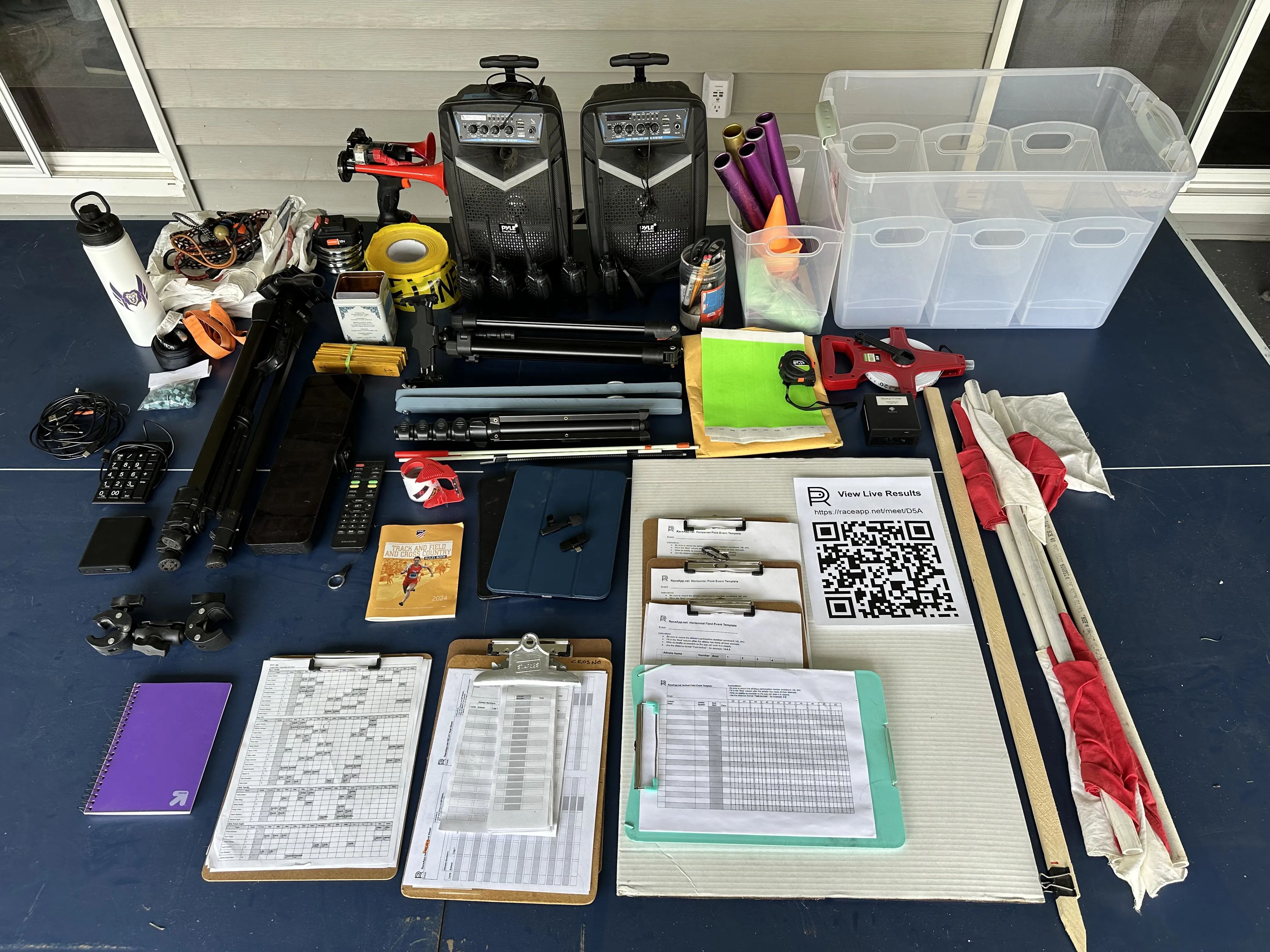
After almost four years of hosting meets, here’s every single thing I load into the car on race day. This list has been built one forgotten item at a time.
Some things get left out based on Cross Country vs Track Meets, but this is where I start each time.
Timing & Technology
| Item | Notes |
|---|---|
| iPad for timing | Runs the RaceApp FAT Timer at the finish line |
| Tripod for iPad | Mounts to the top of the ladder |
| Ladder | Elevated camera platform – gets the iPad up high enough to see all lanes |
| Wireless mic with receiver | Picks up the starting gun sound to auto-trigger the timer. I desensitized mine so it doesn’t false-trigger from crowd noise |
| Receipt printer with extra paper | DIY printing timer – prints backup times for every race |
| USB number pad | Button-finish input for the printing timer |
| Old iPad for results | Sits at the admin table running the RaceApp’s results page so kids can see their results without bringing their phones on the field |
| Laptop | Backup for meet management, exporting results after (optional) |
| Backup phone | Spare device in case something dies (optional) |
| Backup battery | Keep everything charged through a long meet |
| Charging cables | At least two Lightning and one USB-C |
Track Events
| Item | Notes |
|---|---|
| Starting gun | Or air horn starter |
| Batons | For relays – bring extras, they disappear |
| Flags | For hand-off judges & timer signals to starter |
| Popsicle sticks with finish numbers | Hand to runners as they cross the finish line to mark place order. Race recorder collects sticks when recording each runner’s bib number |
| Radios/walkie-talkies | Communication between starter, finish line, and admin table |
| Portable PA speakers | Wireless PA setup – one speaker at the start, one at the finish/announcer area |
| Big LCD Timer | For distance or XC races, I put out a timer with big 3-inch high digits and have a helper manually start it. This is not an official time but adds a nice touch for spectators. |
Field Events
| Item | Notes |
|---|---|
| Tape measures | Small one for high jump bar height, multiple 100ft tapes for horizontal jumps and throws |
| Cones | Mark throwing sectors, runway boundaries, warm-up areas, |
Meet Administration
| Item | Notes |
|---|---|
| List of helpers | Who’s doing what – printed and handed out at the pre-meet briefing |
| Lists of athletes by number | Give each team their number assignments to write down with sharpie on their wristbands |
| Tyvek Wristbands | Bring blank ones for everyone or have a helper write names and numbers on them before the meet. Always bring extra blank one - you’ll need them every time |
| Sharpies | For writing bib numbers on wrist bands, marking clipboards, labeling everything |
| QR codes printed for athletes | For cross country – athletes scan in at the finish instead of wearing bibs or wristbands |
| Printed RaceApp templates on clipboards | Basic Race, Relays, Vertical Jumps, Horizontal Events (x4). Helpers record results on paper, then scan them into RaceApp with their phone |
| Instructions on clipboards | High Jump, Long Jump, Shot Put procedures |
| Backup notebook | In case a template runs out or something unexpected comes up |
| QR banners to meet results (x4) | Big printed QR codes posted around the venue so parents and coaches can pull up live results on their phones |
| Paper Weights | I bring a few small weights to keep stuff from blowing off the tables |
Athlete Support
| Item | Notes |
|---|---|
| Event assignments | Bring several copies of what each kid is doing |
| Spikes & spike wrenches | Someone always forgets theirs or strips a spike |
| Athletic tape | Basic first aid |
| Water – for self | You will forget to drink water. Bring a bottle and put it at your station |
| Water jugs – for team | Big jugs for the team area |
| Tarps | A few years ago I bought a roll of 3ft Tyvek House Wrap. I cut that into 6ft lengths. These get softer over time and fold up much easier than tarps for the kids to sit on. They can be rolled up individually with a rubber band |
| Tie downs | Misc bungies and tie downs. There’s always at least a couple windy meets per season |
Setup & Infrastructure
| Item | Notes |
|---|---|
| Pop up shades | Cover the admin table and the finish line area |
| Table and chair | Admin station – this is where the results iPad, printer, and laptop live |
| Caution tape | Block off the finish area, mark restricted zones so spectators don’t wander onto the track |
| Clear tape | For posting live result QR codes to fences and taping results to coardboard |
| Cardboard/Poster Board | Tape results to it to keep everything organized and easy to scan in |
| Towels | Wipe down wet bleachers for early morning meets |
Situational
| Item | Notes |
|---|---|
| Medals | For championship meets |
| Bike | For cross country – ride the course as lead/sweep to keep runners on course |
The Non-Obvious Stuff
Most of this list is self-explanatory. Here’s what took me a few meets to figure out or “borrowed” from other coaches:
Popsicle sticks solve the hardest problem in DIY timing: matching times to athletes. The iPad captures exact finish times, but it doesn’t know who’s who. A helper at the finish hands each runner a numbered stick (1st place, 2nd place, etc.). A recorder writes the athlete number down on paper in order and collects the sticks for the next race. This makes sure runners don’t wander off or get recorded in the wrong number.
QR codes everywhere. Parents want to see results. Coaches from other schools want to see results. Athletes want to see their times. Four QR banners posted around the venue means no one has to ask you. They just scan and go.
Clipboards with instructions. Your field event helpers might be parent volunteers who’ve never judged long jump before. Give them a clipboard with simple instructions and the order of events for the meet so they can keep track of where we are in the progress. If you log them in to RaceApp on their phones with a temp admin QR code, they can enter results right from the field. No training, no app download. If you don’t want to to worry about live results for field events, use the RaceApp printed templates and scan them in afterward with our AI handwriting detection.
Cardboard. Tape the results of each race to the cardboard in order, keeping everything clean and organized for importing it to RaceApp with our AI handwriting detection.
What’s Not in the Photo
The flat-lay above is everything that fits on a table. The bigger items I also bring: - Step ladder (for the FAT timing rig) - Pop up shade canopy - Folding table and chair - Water jugs - Bike (cross country only)
The Loadout
All of this fits in two big plastic bins plus the ladder and shade. Takes about 15 minutes to load, 20 minutes to set up at the venue, and 15 minutes to tear down. After the first few meets it becomes automatic.
This list has been refined over years and many meets. Every item earned its spot by being needed at least twice. If you’re hosting your first meet, you don’t need all of this – start with the basics and add items as you learn what you’re missing.