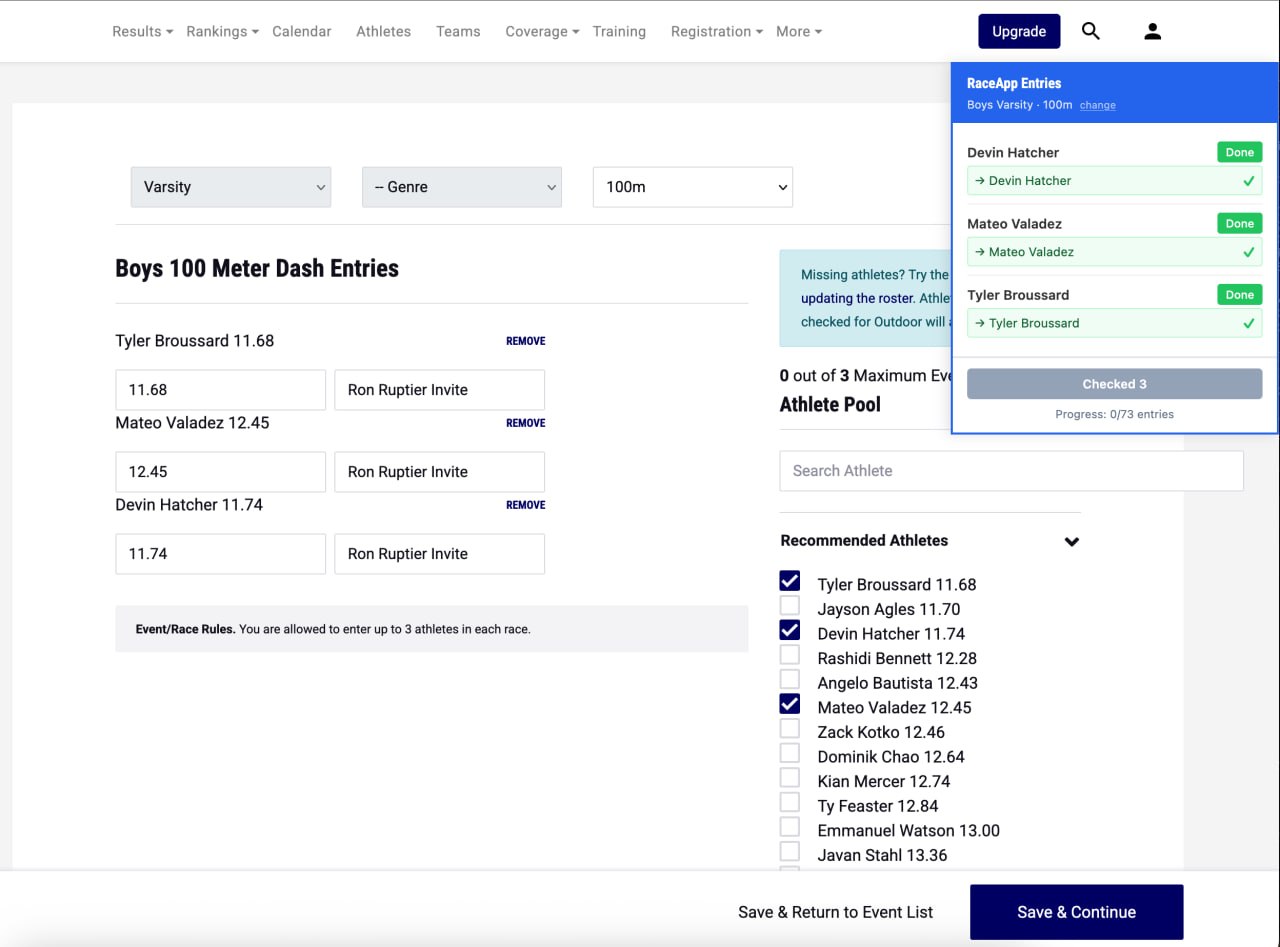
MileSplit’s meet registration works one event at a time. You get a page with your full roster, check the athletes you’re entering, save, move to the next event, repeat. For a single meet that’s 30+ pages.
The annoying part isn’t the clicking — it’s the cross-referencing. You’ve got your event assignments in one place (a spreadsheet, a paper grid, or your RaceApp event planner) and MileSplit’s checkbox page in another. Flip back and forth. Find the name. Check the box. Flip back. Find the next name. For every event, every division.
We built a free browser extension that puts your event planner data right on the MileSplit page so you can stop doing that.
Your Plan, Right on the Page
When you navigate to a MileSplit registration event page, the extension shows a side panel listing which athletes from your event planner should be entered for that specific event. The panel sits alongside MileSplit’s athlete list, so everything is on one screen — no tab-switching, no printing out your plan, no trying to hold four names in your head while you scroll.
Even if nothing else worked, that alone saves you the back-and-forth. But it also matches names and can check the boxes for you.
How to Set It Up
Step 1: Open your event planner in RaceApp. Click the extension icon and hit “Scrape from RaceApp Tab.” It reads your athlete-event grid and stores it locally in your browser.

Step 2: Navigate to MileSplit’s meet registration and open any event page. The side panel appears automatically.
Step 3: Click “Check All Matched” and the extension checks the right boxes one at a time, waiting for MileSplit’s save spinner between each one. Or click individual athletes if you want more control.
You still click Save & Continue yourself to advance to the next event. The panel updates when the new page loads.
Name Matching
It’s common to have slight name variations between rosters on MileSplit and RaceApp. We do our best to help you out.
The extension does three tiers of matching:
- Exact match (green) — auto-checked when you click “Check All Matched”
- Fuzzy match (yellow) — close but not exact, you confirm with one click
- No match (red) — you find and check the box yourself in MileSplit’s list
Most athletes match exactly. I typically get one or two fuzzy matches per meet.
Privacy and Security
- Nothing leaves your browser. No network requests, no server, no analytics, no telemetry.
- Nothing runs in the background. The extension only activates on MileSplit registration pages.
- Athlete names stay local. Stored temporarily in browser storage, cleared when you click “Clear Plan.”
- You control navigation. The extension checks boxes — you click Save & Continue.
The whole thing is open source on GitHub. Two JavaScript files, under 900 lines total. No dependencies, no build step. You can read every line before you install it, or paste the code into any AI and ask it for a security review.
Install
Works in Chrome and Firefox.
- Download the ZIP from GitHub
- Chrome: Go to
chrome://extensions, enable Developer Mode, click “Load unpacked,” select the folder - Firefox: Go to
about:debugging#/runtime/this-firefox, click “Load Temporary Add-on,” selectmanifest.json
Chrome keeps it installed permanently. Firefox temporary add-ons need to be re-loaded each session.
Part of the Event Planner Workflow
This fits into the workflow that starts with the event planner. Assign events at practice on your phone, review on your laptop, then get those entries onto MileSplit without retyping anything.
If you’re not using the event planner yet, here’s the write-up on how it works. It’s free on every plan, including the free tier.
Free and open source. Get it on GitHub →